Usage
This page will show examples of interaction with a telegram_reminder_bot.
This assumes that the bot has been set up and the user is in the allowed users in the configuration,
Start command
The /start command does not take any argument. The displayed message depends on if the user is auhorized or not.

Help command
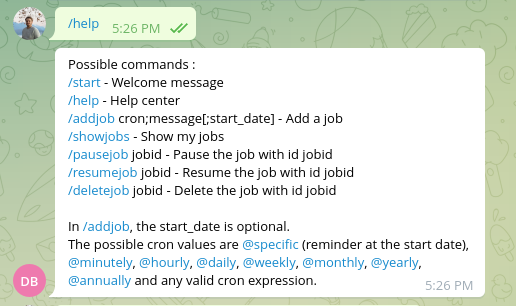
The /help command does not take any argument. The displayed message depends on if the user is auhorized or not.
Add job and normal behavior
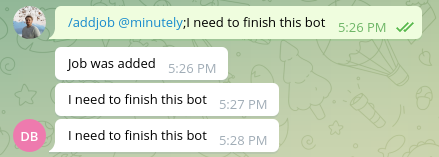
The /addjob commands take up to three arguments :
the cron expression or
@specific.the message
an optional start date
in the format : /addjob cron;message[;start_date].
The cron expression
This can be any valid cron expression (like */5 * * * *) or shortcuts :
Shortcut |
Cron value |
|---|---|
|
|
|
|
|
|
|
|
|
|
|
|
|
|
|
|
The @specific keyword does not represent a cron expression, but a single reminder that will happen at the start date.
Note
When using @specific, be sure to set the start date, otherwise, you will have a speficic remind in the minute following the creation and that’s it.
Note
A job with @specific will be deleted after the message is sent, as it is the only message to send.
The message
The message can be composed of any character that is not a semi-colon (;).
The start date
The start date is optional.
The start date must be given in the format %d/%m/%y %H:%M:%S.
If no start date is given, then the default is now.
Warning
If you don’t give a start date, don’t pull the final semi-colon (;). For instance, /addjob @minutely;message; would fail to parse.
Show jobs
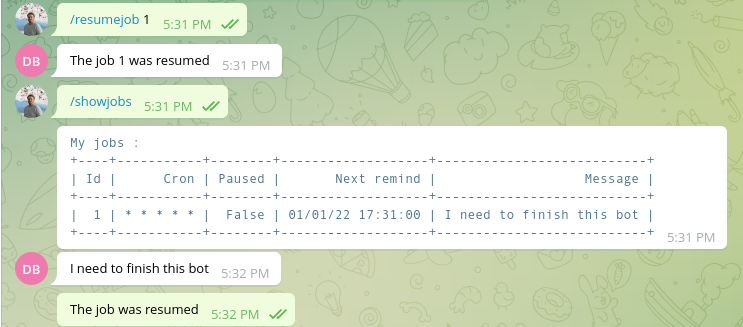
The /showjobs command will display an array with all the jobs associated to the user making the request.
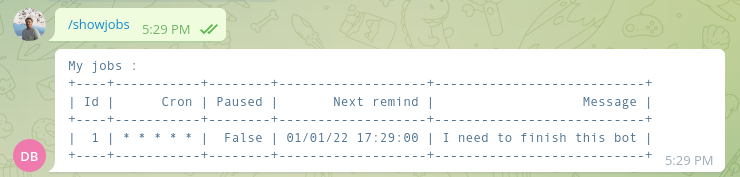
Please note that will the value of “next remind” will indicate that the reminder should happen at 00 seconds, there is no reliable way to tell when the reminder will actually happen (it will happen between :00 and :59 seconds).
Pause job
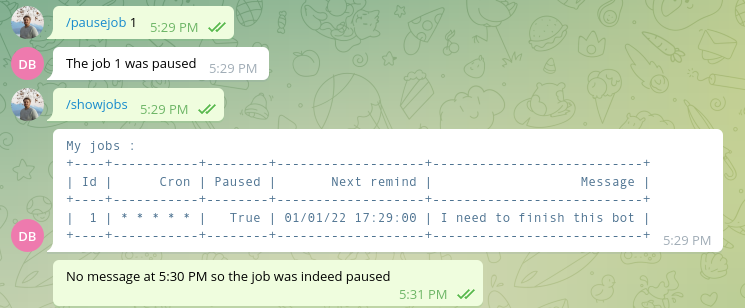
The /pausejob command takes jobid as parameter : /pausejob jobid. The command will only work if
jobidis an int,that is the id of a
Reminder,and the user associated to the reminder is the user sending the message.
No message will be sent for this job until it is resumed.
Note
The command will work on a reminder that is paused, but will have no effect.
Resume job
The /resumejob command takes jobid as parameter : /resumejob jobid. The command will only work if
jobidis an int,that is the id of a
Reminder,and the user associated to the reminder is the user sending the message.
Note
The command will work on a reminder that is not paused, but will have no effect.
Delete a job
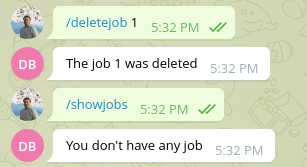
The /deletejob command takes jobid as parameter : /deletejob jobid. The command will only work if
jobidis an int,that is the id of a
Reminder,and the user associated to the reminder is the user sending the message.
Warning
There is no way of reverting a deletejob command.